Data engineering
PostgreSQL Fine-Tuning: A Practical Layer-by-Layer Guide
Memory, WAL, vacuum, indexes, and planner statistics—how to measure first, tune with intent, and keep production Postgres fast as load and schema evolve.
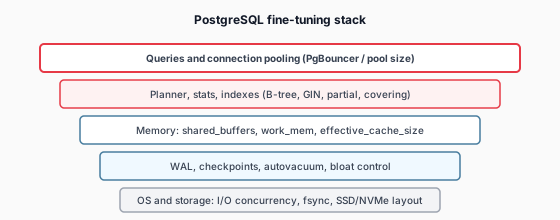
Why Postgres tuning is a stack problem
Slow Postgres rarely has a single villain. Application N+1 queries, missing indexes, underestimated work_mem spills, checkpoint spikes, saturated disk I/O, and connection storms can all present as “database is slow.” Effective fine-tuning treats Postgres as one layer in a full stack—correlating APM spans to query text, wait events, and host metrics—not tuning in isolation.
The goal is not maximal benchmark scores. It is predictable latency under peak, controlled storage growth, and operability: your on-call engineer should know which knob to turn when p95 doubles after a release.
Step zero: measure what matters
Enable pg_stat_statements (via shared_preload_libraries) and retain enough history to see regressions by release. Pair it with:
- EXPLAIN (ANALYZE, BUFFERS) on top queries—on a staging clone with production-like stats, not an empty dev database.
- pg_stat_user_tables — seq scans vs index scans, dead tuple ratio, last autovacuum/autanalyze timestamps.
- pg_stat_bgwriter and checkpoint logs — spikes often correlate with WAL and
checkpoint_completion_targetsettings. - Wait events (
pg_stat_activity.wait_event_type) — IO, Lock, LWLock, BufferPin tell you whether to fix SQL, indexes, or infrastructure.
Rank work by total time (calls × mean time), not mean time alone—a 2 ms query executed a million times beats a 2 s report run once a day for capacity planning.
Memory: shared_buffers, work_mem, and friends
Memory settings trade throughput, concurrency, and risk of spills or OOM. Rules of thumb help you start; production validation decides.
shared_buffers
Postgres caches pages in shared memory. On dedicated database servers with large RAM, 25% of physical memory up to roughly 8–16 GB is a common starting range—not because more is always better, but because the OS page cache also serves Postgres. On containers with tight limits, size to your working set and measure cache hit ratios in pg_stat_database.
work_mem
Sorts and hashes use work_mem per operation per connection. A high global value × many parallel workers × many connections can exhaust memory quickly. Prefer moderate defaults (e.g. 4–64 MB depending on workload) and use SET work_mem for known heavy reporting roles—or tune per-role with ALTER ROLE ... SET work_mem. Watch for “external merge” / “disk” in EXPLAIN when sorts spill.
effective_cache_size
This does not allocate memory; it tells the planner how much cache is expected (Postgres + OS). Set it near total cache available to the database process—often 50–75% of RAM on dedicated hosts—so index scans vs sequential scans are costed realistically.
maintenance_work_mem
Speeds CREATE INDEX, VACUUM, and ALTER TABLE ADD FOREIGN KEY. Raising it (e.g. 512 MB–2 GB on large hosts) shortens maintenance windows—but only for autovacuum and manual maintenance sessions; it does not affect ordinary queries.
# Starting points — validate on YOUR workload
shared_buffers = 4GB              # scale with RAM & working set
work_mem = 16MB                   # raise per-role for analytics if needed
maintenance_work_mem = 1GB
effective_cache_size = 12GB       # ~60–75% of RAM on dedicated DB node
WAL, checkpoints, and write throughput
Write-heavy workloads stress WAL and checkpoint scheduling. When checkpoints cluster, you see IO latency spikes and elevated p95 across unrelated reads.
- max_wal_size — allow enough WAL before forced checkpoint (often 4–16 GB+ on busy OLTP; monitor
pg_stat_bgwriter). - checkpoint_completion_target — spread checkpoint IO (0.9 is common) to avoid thundering herds.
- wal_compression — reduces WAL volume on compressible payloads (PostgreSQL 15+ options vary; test CPU vs IO tradeoff).
- On SSD/NVMe, lower random_page_cost (e.g. 1.1–1.5) and raise effective_io_concurrency so the planner prefers index access when appropriate.
If your “read” latency spikes every few minutes in sync with checkpoint logs, fix WAL/checkpoint shaping before adding replicas or bigger instance types.
Autovacuum and bloat: hidden latency tax
Postgres MVCC leaves dead tuples until vacuum reclaims them. High churn tables with weak autovacuum settings accumulate bloat—more pages to scan, larger indexes, slower sequential scans, and eventually transaction id wraparound risk.
- Ensure autovacuum is on with enough
autovacuum_max_workers(often 3–6 on multi-core hosts). - For hot tables, lower
autovacuum_vacuum_scale_factorvia per-table storage parameters—e.g. 0.02 instead of 0.2 for tables that update constantly. - Monitor
n_dead_tup, last autovacuum time, and index bloat (pg_stat_user_indexes, pgstattuple, or hosted equivalents). - Schedule
VACUUM (ANALYZE)after large data loads; considerREINDEX CONCURRENTLYwhen bloat exceeds measured thresholds—not on a calendar alone.
Connections and pooling
Postgres uses a process per connection. max_connections in the hundreds with bursty app servers often hurts more than helps—context switching and memory per backend add up. Use PgBouncer (transaction or session pooling depending on prepared statements and temp tables) and size application pools to what Postgres can serve with headroom for admin and replication.
Watch pg_stat_activity for idle in transaction sessions—they hold locks and prevent vacuum from reclaiming tuples. Application timeouts and statement timeouts are tuning tools, not just safety rails.
Indexes and planner statistics
The cheapest win is often the right index—not more RAM. Design from query patterns and EXPLAIN plans:
- Composite indexes — column order matches equality filters first, then range/order columns.
- Partial indexes — for hot subsets (
WHERE status = 'open') to shrink size and speed writes. - Covering indexes (INCLUDE) — avoid heap fetches for index-only scans when visibility map allows.
- GIN/GiST — for jsonb, full text, arrays, and geospatial—watch write amplification on high-ingest paths.
Stale stats cause catastrophic plans. Increase default_statistics_target selectively with ALTER TABLE ... ALTER COLUMN ... SET STATISTICS on skewed columns. After bulk loads, run ANALYZE; consider extended statistics for correlated columns (PostgreSQL 10+).
-- Example: partial index for active orders dashboard
CREATE INDEX CONCURRENTLY idx_orders_open_created
  ON orders (created_at DESC)
  INCLUDE (customer_id, total_cents)
  WHERE status IN ('pending', 'processing');
Parallelism and resource groups
Analytical queries benefit from max_parallel_workers_per_gather and related settings—but parallel workers multiply memory use (each can allocate work_mem). Cap parallelism on OLTP-primary instances; route heavy reporting to replicas or warehouse engines. PostgreSQL 15+ resource groups (where available) or external schedulers help isolate batch from transactional traffic.
OS and storage beneath Postgres
Place data directories on low-latency durable volumes; separate WAL onto dedicated NVMe only when measured WAL IO contends with data files— not by default on every install. Align filesystem choice (xfs/ext4) with your cloud provider guidance; use noatime where supported. Ensure transparent huge pages are off on Linux hosts running Postgres (a classic latency footgun). At the application layer, batch writes and avoid chatty transactions so fsync pressure stays predictable.
AI-assisted tuning: prioritize, don’t autopilot
When APM ties user-facing latency to specific Postgres statements, AI can cluster regressions by plan hash, suggest index candidates from slow query logs, and flag autovacuum lag on tables touched by recent migrations. That accelerates triage—it does not replace human judgment on correctness, lock risk, or CREATE INDEX CONCURRENTLY scheduling.
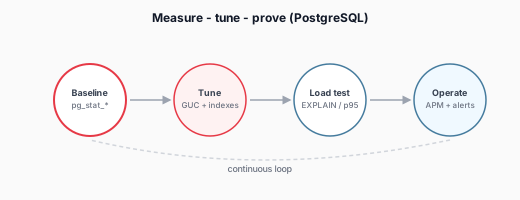
The durable pattern is a closed loop: baseline → change one variable → load replay → compare p95 and error rate → document in runbooks. Teams that operationalize this loop—often alongside Performance Engineering practices—keep Postgres fast as schema, traffic, and hardware evolve.
A sensible rollout checklist
- Capture top 20 queries by total time and top wait-event buckets for one peak week.
- Fix application patterns and indexes before raising global memory knobs.
- Introduce or tune connection pooling; lower effective connection count to Postgres.
- Adjust WAL/checkpoint and autovacuum for write-heavy tables with evidence from logs.
- Re-analyze and load-test; promote changes through staging with rollback plans.
- Wire alerts on replication lag, dead tuples, checkpoint duration, and statement latency SLOs.
PostgreSQL rewards methodical tuning. Measure at the layer where time is spent, change one lever at a time, and prove the win under load—your future on-call shift will thank you.
Engineering and research perspective from the CognitiveBricks team. Practices evolve quickly; validate approaches against your security, license, and compliance requirements.